Tag: Marketing

  • Getting Started with Apps Script as a Marketer

    Getting Started with Apps Script as a Marketer

    There are a couple of ideologies and processes that form the tenets of marketing. One of them is automation, and another is being able to call data & parse data without it being an ordeal.

    One great place for you to experiment is with Google apps scripts, a JavaScript-based set of instructions similar to JSON in data. Apps Script can be used to automate repetitive tasks, create custom functions, import data & connect to external tools. So, you could automate reports, thank you emails, aggregate specific sets of data, etc.

    Don’t let the JavaScript base scare you, it’s quite enjoyable, even if, like me, you’re not a developer. The understanding you need is not as extensive as an app or website development.

    What is Apps Script?

    Apps Script is a powerful tool in Google’s productivity tool belt. It is a rapid application development platform that makes it fast and easy to create business applications that integrate with Google Workspace. You are probably already using a couple of Google products, this is a major add-on you don’t want to miss out on.

    A Simple Demonstration

    Say you are in charge of marketing at a MarTech company and you are collating engineering tools that help marketing teams run faster and effectively. To do this, you are collecting data into a spreadsheet and want to know the best tools to help each segment of your marketing become a powerhouse.

    Therefore, you want to (a) split a particular column into a highlight that tells you what a tool does at a glance. Since this is a function you’ll do almost every day when you get certain data sets, you want to automate this task.

    To do this, you want to write the function, record it, then automatically run that recording every time. The way to do this is to create a macro and start a recording.

    To demonstrate this, I am using a dataset from data.world named ‘Engineering as Marketing’ – here’s the link to it. This simple demo is to introduce you to Apps Script – nothing fancy or complicated. Yet.

    Sample data - 1 - Apps Script for Marketers
    Here, the sample dataset I’m using for this demonstration.
    Macro - Apps Script for Marketers
    I start the macro, recording it.
    Array Formula - Apps Script for Marketers
    I point Cell H2 to Cell B2 and get the number of strings I need for my highlight using the Array Formula in the Spreadsheet.
    Updates - Apps Script for Marketers
    We apply this to the entire H column, it gets updated as the data is updated using =ARRAYFORMULA(PROPER(REGEXEXTRACT(B2:B,”[\w]* [\w]*”)))
    Function ready -  Apps Script for Marketers
    We can save our recording, give the name Highlight Tool Function, and assign a number to it. Now, this script runs in the background and we can rerun using Ctrl+Alt+Shift+3.

    Next, we go to the Apps Script side of things. Think of it as going to the upside-down world – an alternate universe of what we’ve just done. (Hello, fans of Stranger Things 😉)

    You get to this side via the Extension at the top menu of the Spreadsheet. Here, you see what the Javascript<>App Script function we just created looks like. If you change a couple of details, like the range, and run the script, the changes show up on the spreadsheet.

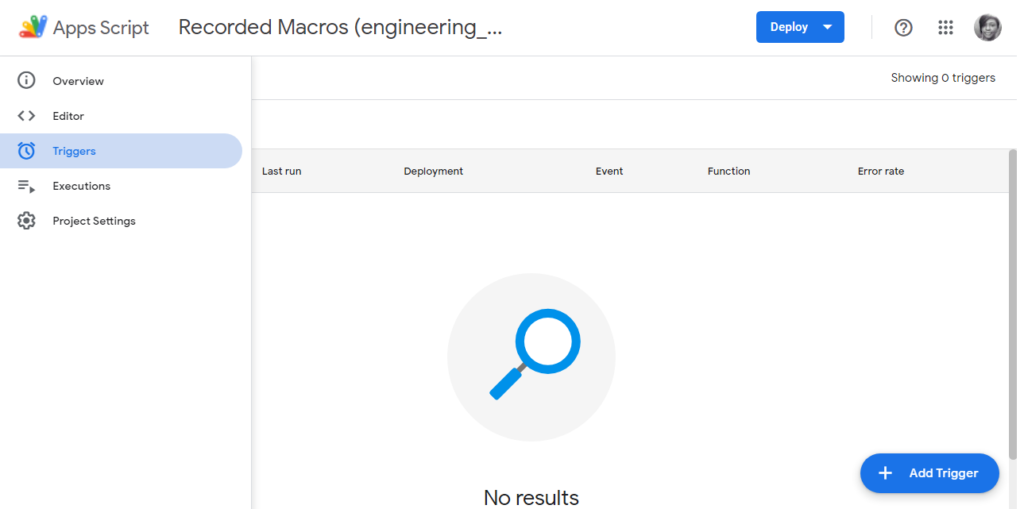
    Now that you’ve automated the script to run via the macro, then (b) you want to set up triggers so that this function can run by itself and send you notifications of new highlights.
    Adding Triggers - Apps Script for Marketers
    You go to the Triggers menu on Apps Script and click “Add Script”.
    Triggers - Apps Script for Marketers
    You then specify what the trigger will look like and how you want to receive notifications when the script runs.

    I hope this serves as a good basic foundation for understanding Apps Script. What else would you like to automate?

    **Resources:
    Zapier
    CMS Wire
    Udemy

  • How to inculcate UX (User Experience) into your marketing process

    How to inculcate UX (User Experience) into your marketing process

    Imagine you are looking for something to buy on the Internet. Say you want to buy something specific like Peppermint Tea because the normal tea bags containing caffeine are worsening your leaky gut (health) condition and someone had told you that Peppermint tea is perfect for leaky gut. So, you decide to do some research and then buy Peppermint tea. And off you go walking around mentally and looking at different posts/discussions on Peppermint tea. 

    You find one title that catches your attention and you decide to dive in, you dive in and then all of a sudden while digesting the information (and pseudo-making a decision to buy from that website) the button shows you more information and takes you to the purchase page which refuses to work. 

    Perhaps that’s not what happens, you decide to buy and you find navigating to the purchase page very tedious, plus the information on the purchase page is quite confusing.

    It doesn’t matter how you got there (which is the role of Marketing) in the first place if navigating/information architecture is tedious, you’ll most likely abandon the purchase and drop off. 

    We tend to think of user experience only in the context of product development and management. But it goes way beyond that, user experience flows all through your optimization attempts and calls for the product. Considering that Marketing is about bringing users in and getting them to perform certain actions that affect your bottom line, a good UX design should accomplish the business goals of your website by optimizing the lead conversion process.

    If you are in charge or involved in Marketing for your website/product, you need to ensure that asides from creating awesome content and a beautiful optimization path, your primary goal of converting visitors into leads and leads into buyers is well mapped out and fulfilled. Your conversion path should not scare people away, it should be intuitive and embracing. And the way to make sure that is done is to incorporate empathy into your design in achieving a conversion process that turns leads into buyers.

    After breaking down the different steps of a customer lifecycle that you want to optimize, which include (according to Segment’s top-notch analysis):

    Acquisition: Drive users to your site through various channels and get them to sign up.

    Activation: Engage users early on by having them participate with your most important feature(s).

    Retention: Get users to come back, visit and use your product multiple times.

    Referral: Leverage users who are jazzed about your product to refer others.

    Revenue: Convert users to pay you money for your services.

    You should then look at how great User Experience will help you achieve your set goals at each step of the Customer lifecycle or your own goals.

    At the Acquisition stage, make sure that Landing Pages are well designed, with the information well structured. Test colours, buttons, copy and general messaging – your calls to action must be clear and unambiguous.

    At the Activation stage, your funnel needs to be designed and defined in a way that makes it easy for your users to go from one point to the other. Be clear and succinct in what they stand to benefit, and how to use your product. Optimizing user behaviour and campaigns come in here, let your marketing automation flow and be seamless in communication/experience.

    And at the Retention stage, delight your users so that they can keep coming back. To get them to keep coming back, you have to make sure that their first couple of experiences met their needs without any hassle (user interviews can help you figure this out), and feedback on their previous experience should feed into how you design your product and funnel – which in turn helps your marketing become better.

    For referral, you need to design an easy referral machine into your user flow, so that it is easy for them to refer new people without it being a burden.

    At the revenue stage, make payment very easy for people – don’t use ambiguous, clumsy messaging and design elements. Design for trust, security, and ease.


    This piece was first published on Acumen Digital’s blog.