Blog

  • YouTube Ads I love: McKinsey’s Forward Program Ad

    YouTube Ads I love: McKinsey’s Forward Program Ad

    I absolutely love the 2 new YouTube ads for McKinsey Forward Learning Program hashtagged #takeastepforward.

    They’re so well done! Super crisp storytelling, aspirational without feeling too far-fetched. The way they tie personal growth to career transformation is really punchy, and the #takeastepforward tagline is a simple but motivating hook.
    The first ad with the woman labouring over her response to a customer complain and then spiraling into what that means for the product hits especially hard – chef’s kiss.

    And the second one with the guy having a mini nervous breakdown over whether to contribute to the meeting is a great depiction of imposter syndrome. His inner dialogue is so relatable, its genius.

    I like how its easy on the eyes, there’s no verbal resolution at the end, except for the text-based straight-sell.

  • Lesson Note: Understanding Intermediate Statistics Using Rent the Runway Dataset

    Lesson Note: Understanding Intermediate Statistics Using Rent the Runway Dataset

    This week, I’m taking a class on Intermediate Statistics as part of my Technical Marketing module on CXL and it has been fascinating. As one who studied English and probably avoided statistical abstractions for most of her life so far, the fact that I’m enjoying this class makes me wonder about a lot of presumptions I’ve had.

    To practice what I’ve been learning, I’ve looked for a public dataset my marketing mind wants to dig into – in this case, Rent the Runway clothing fit feedback, and here I try to sink my teeth into it.

    Rent the Runway is an e-commerce platform that allows users to rent, subscribe, or buy designer apparel and accessories.
    In this exercise, I’ll be practising my intermediate statistics lesson from CXL’s Technical Marketing course to:

    • understand how satisfied customers were with their cloth fitting.
    • analyse the areas to focus on.
    • check if there’s a relationship between two variables in the dataset

    Based on the public dataset used by (Rishabh et al., 2018), I’ll be using contain measurements of clothing fit from Rent the Runway, gotten via a short survey targeting purchasing customers.
    Containing the following metadata:
    ratings and reviews
    fit feedback (small/fit/large etc.)
    user/item measurements
    category information

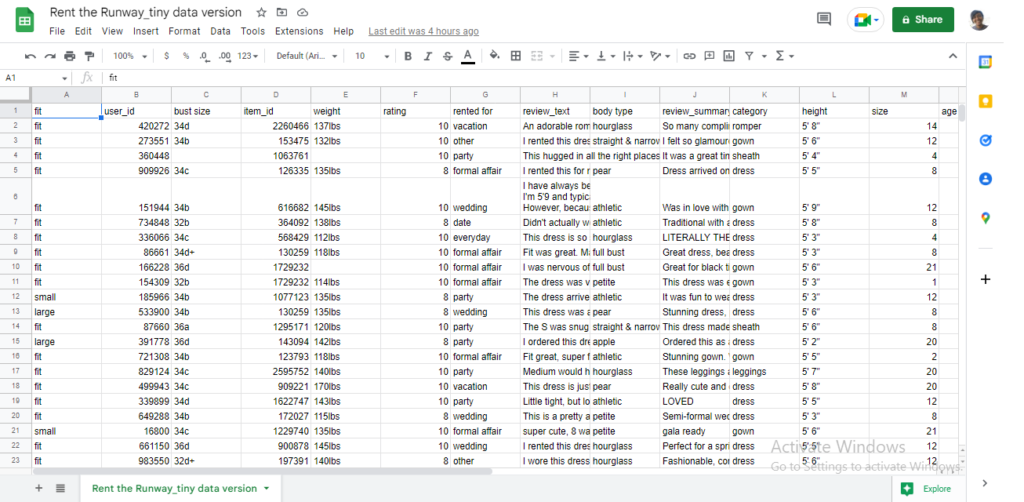
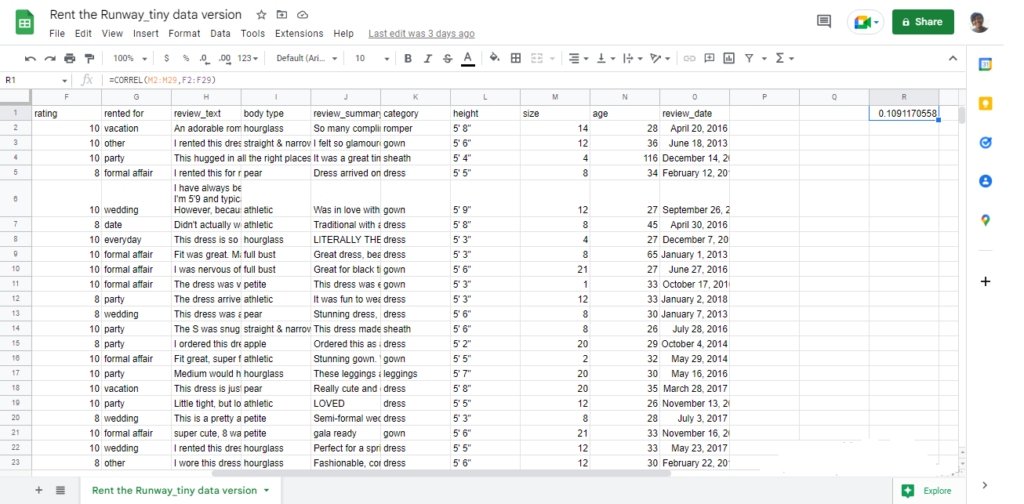
    Here’s what the dataset looks like. I’m not using the full dataset volume, just a part of it to illustrate and practise.

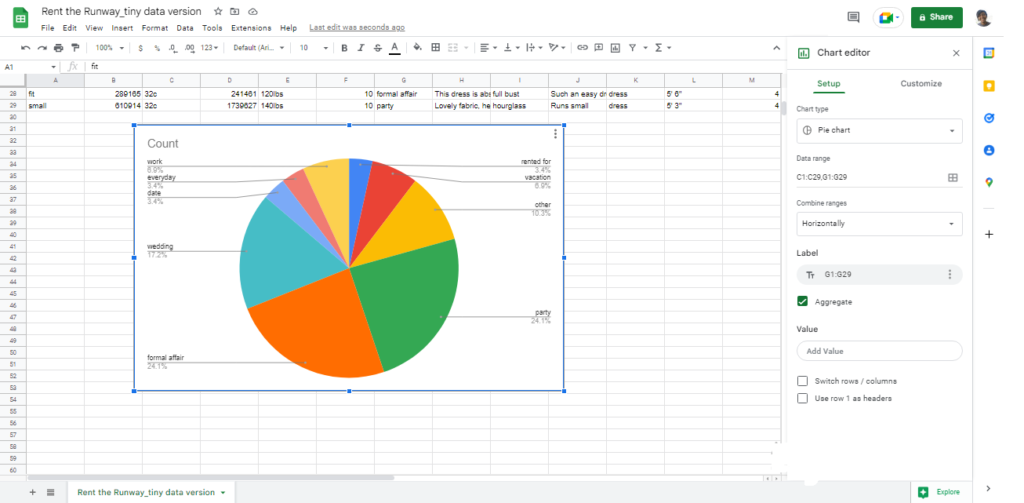
    What occasion/event do people rent the most for?

    A piechart seemed the most appropriate for answering this. It shows clearly that parties and formal affairs are the topmost reasons for renting, followed by weddings.

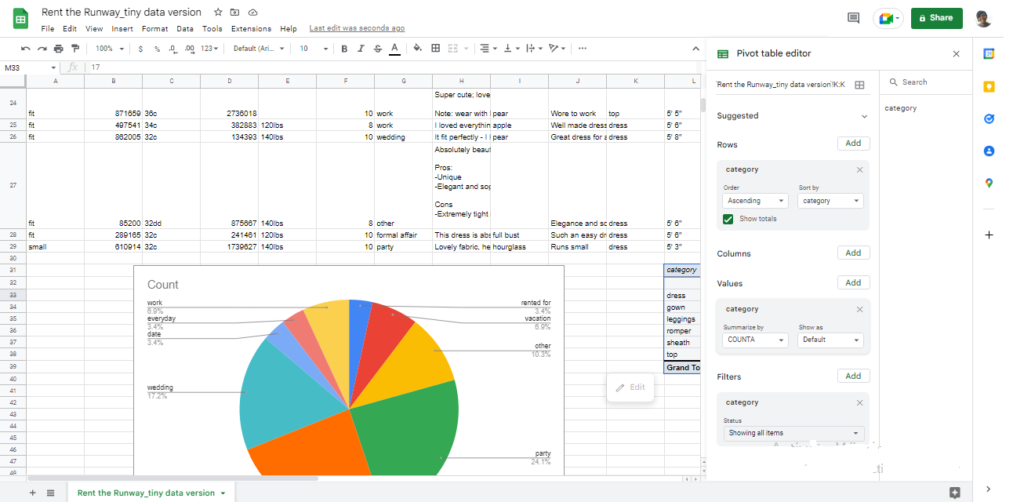
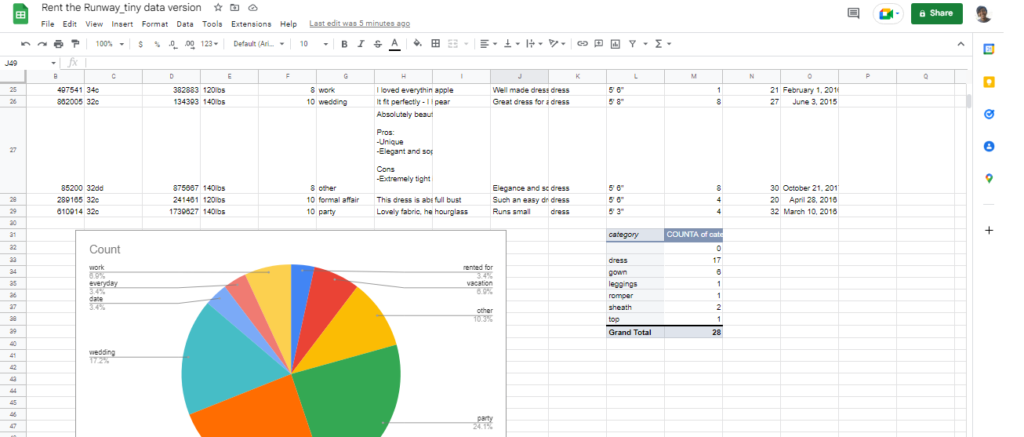
    What category of clothing do people rent the most?

    Identifying correlated variables

    Here we want to gauge the extent of the relationship, or dependence, of two variables.
    In this case, we investigate if there is a correlation between customer clothing size and the ratings they give. Using the CORREL function in Google sheets (which takes two input ranges for the two data sets to find the correlation), we check if there’s a link between customer size and ratings.

    The CORREL shows there’s a positive relationship between customer size and the ratings. The positive correlation coefficient indicates that they grow in the same direction – meaning a higher measurement in one data set will lead to a higher measurement in the other.
    Note: Correlation does not necessarily imply causation. Just because two variables are behaving in the same way. It does not mean one caused the other to occur.
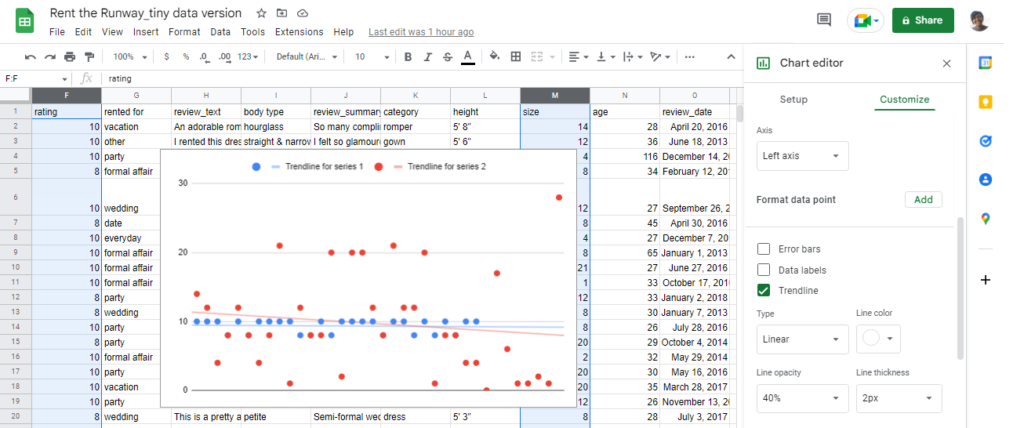
    Using the scatter chart, we can see that although the data isn’t super-random, the linear function doesn’t describe the data very well.

    In some form of conclusion, understanding statistics is helping me see how to utilise customer data, in predicting and modelling behaviour that works for marketing.


    Resources:

    Decomposing fit semantics for product size recommendation in metric spaces
    Rishabh Misra, Mengting Wan, Julian McAuley
    RecSys, 2018.

    Sheets for Marketers.

  • My Technical Writing Process (mini version)

    My Technical Writing Process (mini version)

    I usually start my technical content creation process with research, reading all there is to know about the product I’m writing on. I find it essential to research from the angle of the customer pain points and the step-by-step technical know-how involved, among other things.

    The first audience I write for is myself:
    I begin by reading the existing documentation, to give me insight into the overall document set. This helps me get into the user mindset of how I would approach understanding the product/tool as a new user.
    Once I read the documentation and know how the tool is used and what questions the user could have while reading my content. I move on to the user testing phase. In this phase, I use the tool myself and document all the steps I take during the process.
    I document all the things that I had to look up, all the mistakes I made, all the workarounds I found, and all the questions that popped up in my mind. These give me a complete picture of the tool and how it works.
    And then I share this document with the engineers and product managers, to get their feedback and to make sure that I understood the process correctly.

    Next, I do an audience analysis by building basic user personas, and writing questions that the user may have in using the tool – what tools does the user have available? Is this a new user or an experienced one? Why did they decide to come here? What’s the statement of the mind of the user/reader – angry, frustrated, excited? This helps me decide what the tone of the content should be. By imagining myself in the reader’s place, I can develop the best content for their scenario(s).

    I also detail what I hope the reader achieves by reading my content. Do I want them to:
    Solve a problem
    Perform a task
    Learn something new
    Make a decision
    This way, I can create content that would help the reader achieve the goal I’ve identified.

    I also take the time to examine my unconscious bias, to ensure my content is inclusive and works well for all readers.

    Next, I move to the actual writing phase, where I get the first draft of my content done, writing freely from all the information, audience analysis, research, and structure.
    Then, I rewrite the content and edit it, making sure it is correct, well-rounded, clear and consistent.

  • Of Curiosity & Digital Ocean

    Of Curiosity & Digital Ocean

    One of my recent favourite activities is watching YouTube Ads made for DevTools and products that are a tad technical. It gives me insight into how the company sees and portrays its gravitas. It also helps in understanding the language that they’re using to paint the world they are conveying, the audience they are trying to capture, etc.

    A major reason I enjoy engaging in this activity is to distil my thought process and simplify how marketing works for DevTools. But mostly, it’s to just navigate the corridors of my curiosity.

    Today, I’m curious about Digital Ocean Ads.

    Digital Ocean describes itself as a platform that simplifies cloud computing so builders can spend more time creating software that changes the world. Businesses grow faster when developers can build on the simple, affordable cloud they love – Digital Ocean, therefore, enables Devs to build and perform optimally.

    The first time I saw this King of the Ocean Ad, I laughed so hard! I love the wordplay on Atlantis, the ocean as both Digital Ocean and an endless array of developer tools. Spot on Ad that addresses both the developer, without ignoring the c-suite decision maker.
    This one is super visually appealing. I absolutely love it! The details, script, and everything in between are tailored to get you to pay attention and follow the journey through.
    I especially like how it’s both a mini-explainer and a brand story in one.
    The voice in this Ad, is the real catch – very inspiring, yet straight. This Ad is a no-bullshit, bulls-eye, technical one that sells what you get when you upgrade to Premium Droplets.
    This one is also a fave of mine! Great use of metaphors in depicting the benefits of the MongoDB partnership on Digital Ocean.

    One thing I noticed, is how YouTube seems to be an extension of Digital Ocean’s customer support, where complaints are attended to. I’m not sure if that’s a good thing or not, I found it a bit fascinating, considering the fact that YouTube is mostly a media consumption platform and not the most tête-à-tête space for customer support.

  • Stanning CircleCI YouTube Ads

    Stanning CircleCI YouTube Ads

    CircleCI has some of the best ads that I’ve seen! With simple, well-articulated use of language, they know how to pass across the message of the technical process(es), continuous integration and continuous delivery with the most amazing clarity. 

    From creative direction, artistic representations, choice of words, and colours to just about every element is inspired. 

    Even if you are not an in-depth technical person, you’ll understand and get drawn in to take the product for a spin.

    What exactly is CircleCI?

    CircleCI is a CI/CD platform that helps software teams work smarter and faster with code being built, tested, and deployed confidently, thereby speeding up your engineering velocity at scale.

    Basically, enabling high-growth businesses that depend on great software to automate CI/CD without trepidation.

    Back to the Ads

    This one’s my favourite. I’ll take a wild guess and say it’s targeted at CIOs, CTOs, and C-suite in general, as the language is sharp, simple and straightforward without losing the elegance of IT-savviness.

    This one on Orbs is so beautiful, it feels like an Ad for a malaria cure.

    And this one speaks to developer needs, from a holistic perspective.

    Last one! Not the most fun Ad, but one that points out the necessity of DevOps from a customer perspective.

    Your turn! Share your favourite Ads that depict the technical in the most real way you’ve ever seen.

  • Marketing Open Source Software and Projects (1)

    Marketing Open Source Software and Projects (1)

    Ruminating on the overly demystified line “if you build it, they’ll come”. I realize that it could serve as a no-brainer when applied to Open source, yeah? Considering that it’s developing a product/software and opening it up to the world – and if it’s opened up to be used for free by anyone, then it should easily sell itself.
    I mean if you heard that something was free, then naturally you should see a crowd gathered over it, get interested in it and want to take it out for a spin.

    Well, there’s the first ‘hearing about it’ part.
    Then there’s the scenario where there isn’t just one free or open product. What if you had multiple opened-up products? How do you make the one you are selling stand out from the rest?

    There are two ways to think about marketing in this environment:
    1) That the idea of the software being open source is the marketing strategy in itself.
    2) That you have built this software to be open, and you need the audience. The way you’d traditionally think about marketing.

    Open source as Marketing

    See what I did there? Open source as Marketing…? Okay, just kidding. Back to the matter.
    Open source as Marketing strategy depicts that you open up the source code of your software, for collaborators, contributors, etc, for them to be part of the building process, build a community around the project, and help the community (which has been created around it) get the best out of using the tool/software, help the community learn to personalize the software for their own use-case and scenarios.

    Neha Narkhede describes this well when she said “First, open source isn’t a business model; it is a go-to-market strategy. Done right, it really solves one of the hardest problems in building a business — getting traction for the product. Focusing on developer evangelism and community building is key to adoption of open-source technology.“

    Marketing your open source project(s)

    Marketing is crucial to the success of your open source project. As there are so many open source projects competing for the same set of audience’s attention, it becomes essential to plan for optimal marketing, to attract contributors, find users, showcase the value, and raise the profile of your project.

    However, marketing for open source software, especially commercial ones, may not take the same traditional marketing route that we are accustomed to, as product education is really a better marketing approach to ‘selling’ open source software.

    As Jakub Czakon, CMO of neptune.ai, says, “Developers DO NOT want to be persuaded. They want to be educated, enabled, and inspired.” You’ll therefore want to craft your marketing strategy around this, knowing fully well that your target audience consists people (read Devs) who want to work on and be associated with projects that others find valuable.

    In this article on Opensource.com, Scott McCarty uses Kubernetes to portray how marketing should be defined when thinking about open source:

    “For example, Kubernetes is a great technology and a great upstream project. Any customer interested in running containers at scale is probably aware of this technology. However, some customers are looking for a very general-purpose, hosted solution where somebody else runs it for them. Other potential customers are interested in building a highly customized solution on-premise with tight security controls. These two buyers are buying for different reasons.”

    Marketing your open source project should, therefore, be approached from a very intentional, education-laced, authentic, strategic PoV.

    What are your thoughts on marketing open source projects?


    This is an ongoing thought process. I’ll update as my thought processes information and new knowledge. 😉

  • Analysing your marketing data with Python using Google Colab

    Analysing your marketing data with Python using Google Colab

    For this next magic trick 😂, I am going to attempt to automate a marketing report. To do this, I’m using this Sales data from freeCodeCamp’s Github, which I’ve renamed Bikesales_data in this Spreadsheet, and I’ll be running this on Google Colab. 

    A little bit about Colab

    Google Colab, short for Google Colaboratory is a free Jupyter (a powerful tool for interactively developing and presenting data science projects) notebook environment that runs on Google’s cloud servers, letting the user leverage backend hardware like GPUs and TPUs. 

    Colab allows you to write and execute Python in your browser, with zero configuration required, access to GPUs free of charge, and easy sharing.

    Here goes!

    We want to look at how much revenue comes in by customer gender and age group, so we can know how to expand/focus our marketing efforts and initiatives.

    Analysing your marketing data with Python via Google Colab - 1
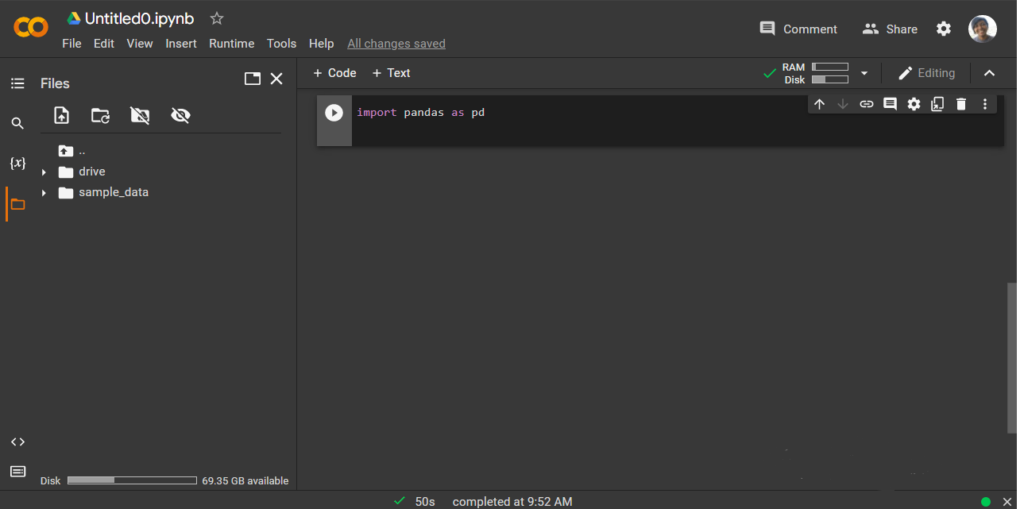
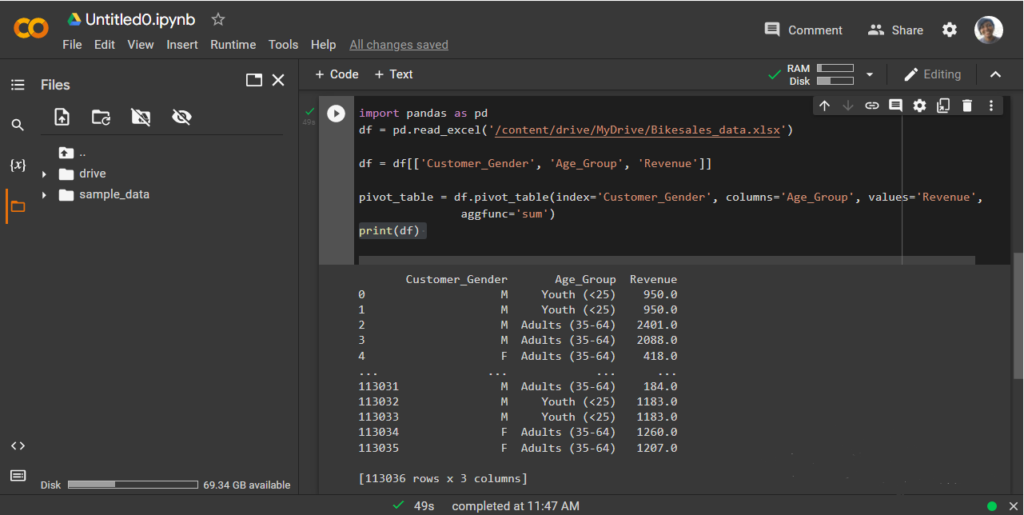
    First, we have to import this spreadsheet, so I’ll use pandas by importing pandas as pd.

    Breakdown of terminologies by Data Independent.
    Import = “Bring this functionality or library to my python script”
    Pandas = The library you want to import, in this case, it’s pandas
    As = The python nomenclature for creating as alias. This is a fancy way of taking a long word and referencing it as a short word
    pd = The standard short name for referencing pandas
    Analysing your marketing data with Python via Google Colab
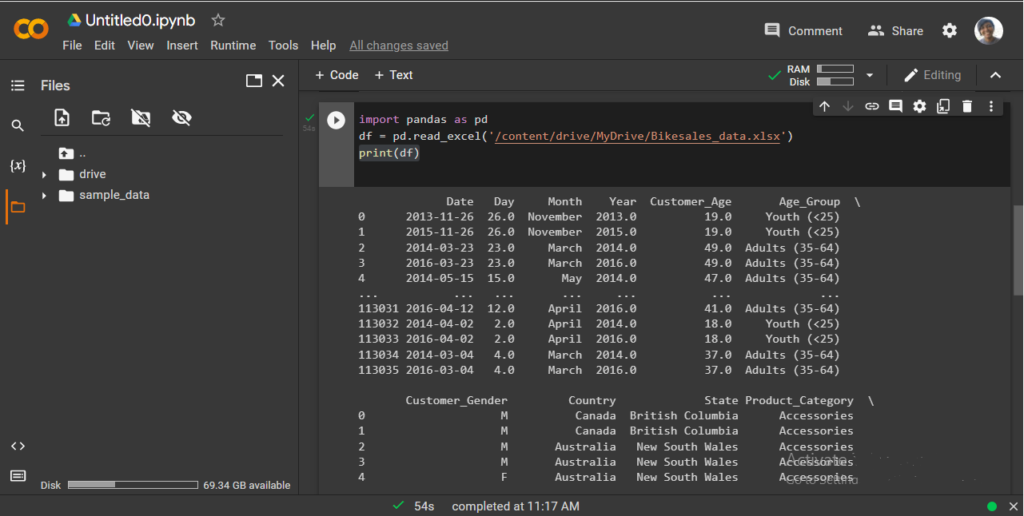
    • to read the spreadsheet, we have to use the read_excel.
    • then set the data frame variable to df.
    • then print to see the data frame.

    Next, is to create a Pivot table.

    Analysing your marketing data with Python via Google Colab
    • we select multiple columns using the double brackets. then we indicate the columns we want
    • to select: Customer_Gender’, ‘Age_Group’, ‘Revenue.
    • now, we can set df to our selection.
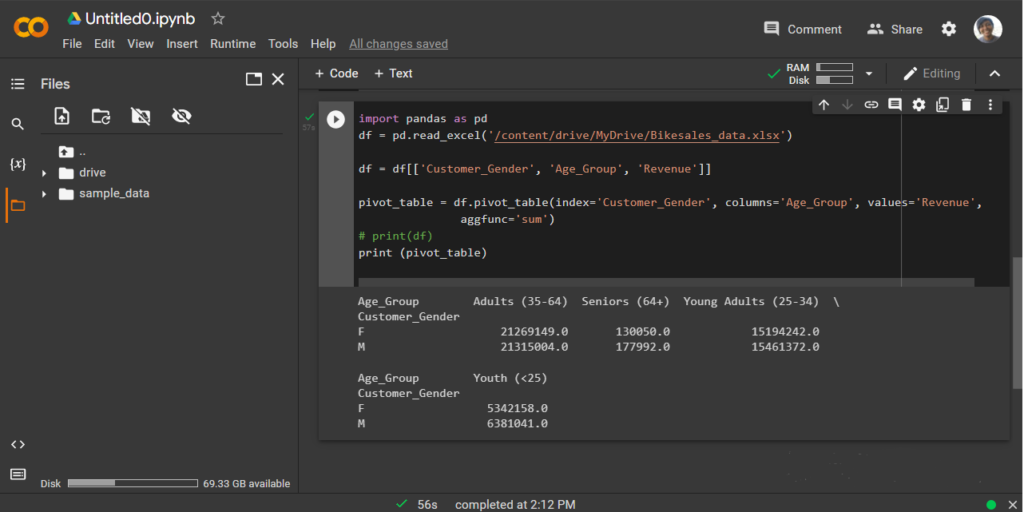
    • to continue with our pivot table we have to define which is the index, column, and values.
    • remember our is to see how much revenue has come in through each gender, according to their age groups.
    • after defining these three, we set the function we want, in this case, we want the sum.
    Analysing your marketing data with Python using Google Colab
    and then we print the pivot table, to see our groupings all summed up nicely in Python.

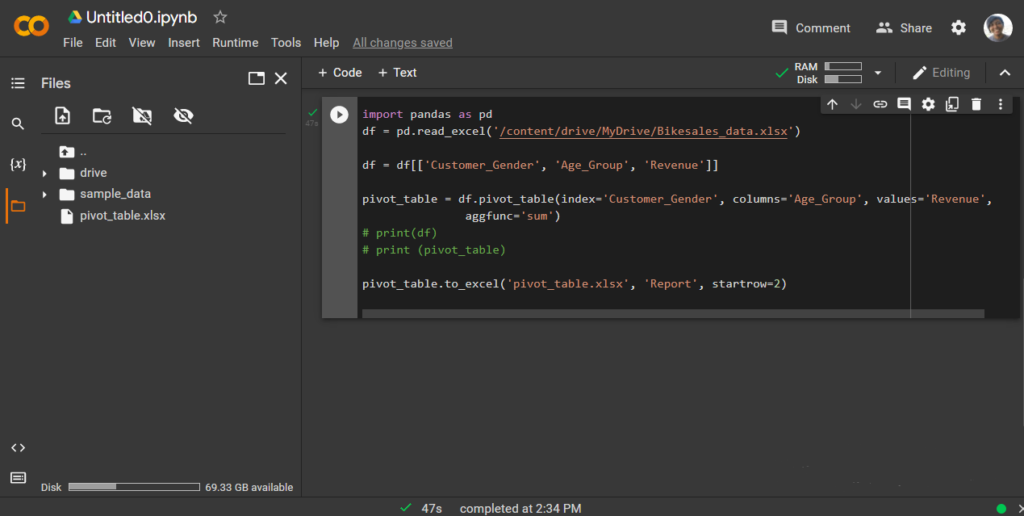
    Next, we export this pivot table into a spreadsheet (to a sheet named ‘Report”, so the report is clear and well visualised.

    to do this, we set our parameters and run it, which is the pivot_table.xlsx that you see on the left-hand menu side of my colab environment.
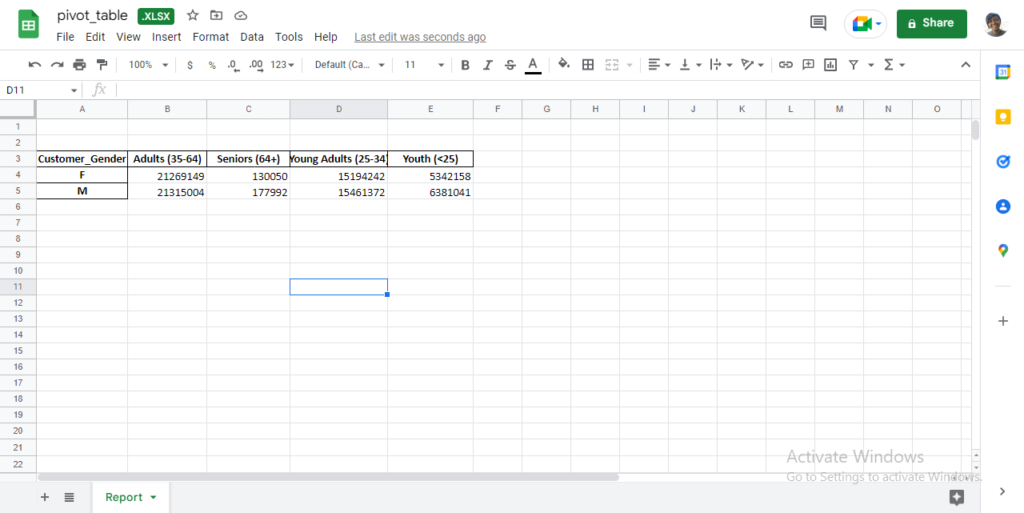
    Analysing your marketing data with Python via Google Colab - the result.
    voila! the result.

    Creating a Barchart to visualize this.

    To create a bar chart to effectively visualize this data result via python, see the breakdown:

    Analysing your marketing data with Python via Google Colab - BarChart 1
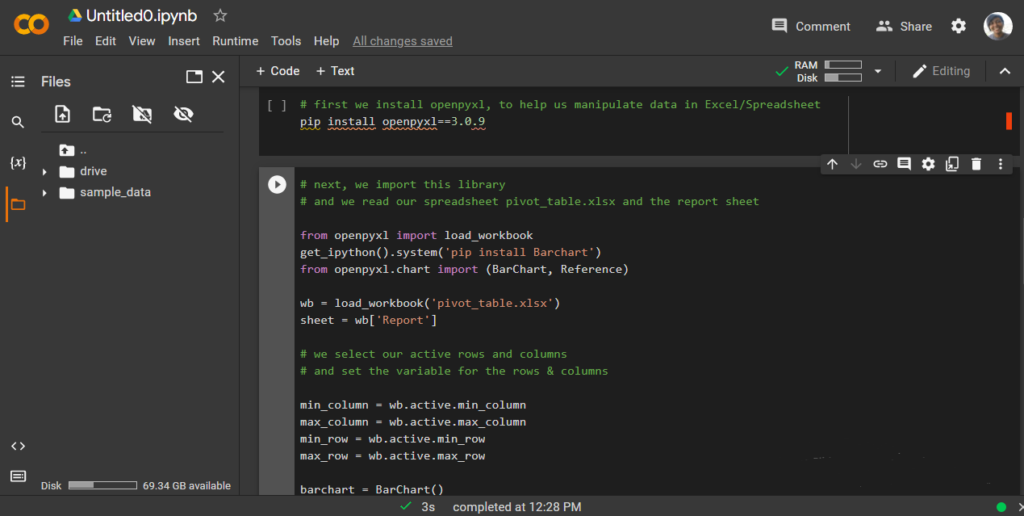
    installing openpyxl, to help us manipulate data in Excel/Spreadsheet. Follow the instructions in the green #comment.
    Analysing your marketing data with Python via Google Colab - BarChart 2
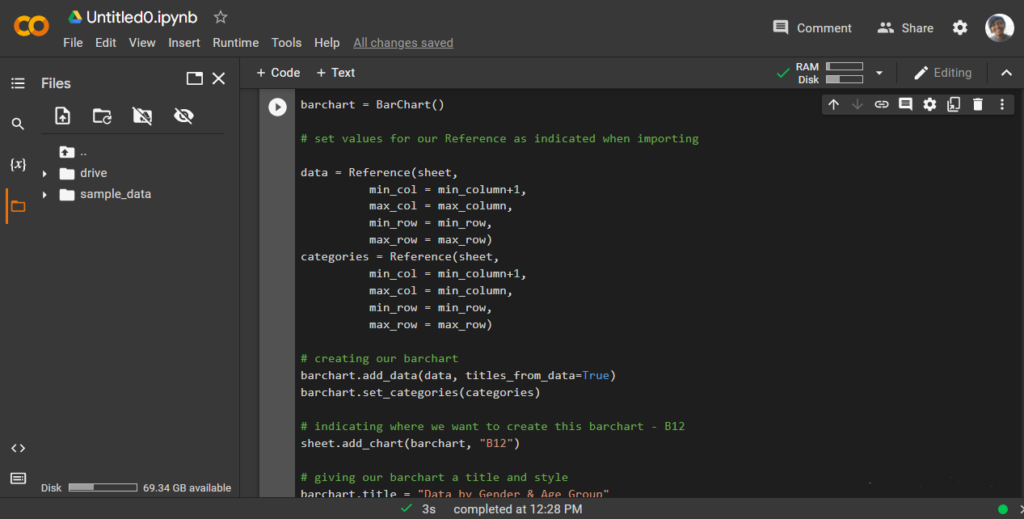
    set variables and values for our bar chart data and categories.
    Analysing your marketing data with Python via Google Colab - BarChart 3
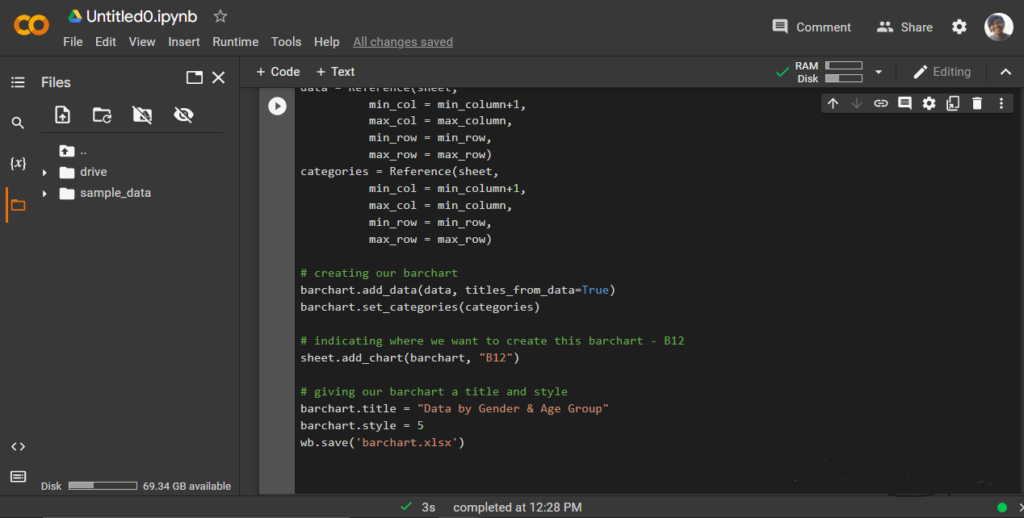
    define title, style, and save.
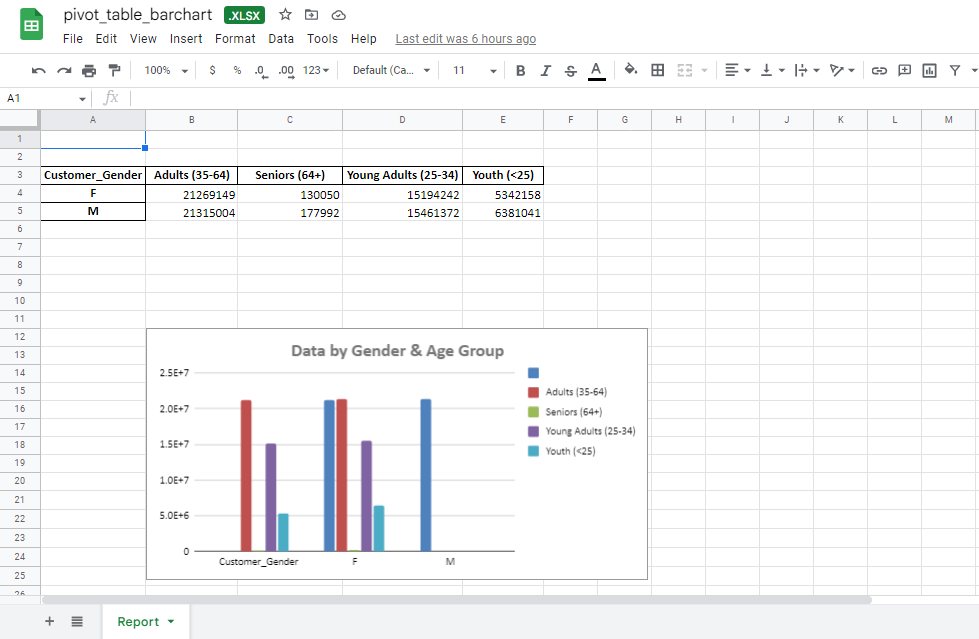
    Analysing your marketing data with Python via Google Colab - BarChart
    here lies our result, a bar chart. voila!

    Over to you. What types of marketing/sales data have you been working with lately? And what tools, methods, etc, have you been using to get the best out of those data?

  • 3 Web Hosting companies and the way they market their brands

    3 Web Hosting companies and the way they market their brands

    For this exploration of the Web Hosting wonderland, I’ll be looking at 3 hosting companies: GoDaddy, Namecheap, and Bluehost. And I’ll be writing this breakdown from the perspective of how they communicate their offerings & USP, their website, their content marketing strategy, and any other marketing strategy they have.

    Why Web Hosting? Well, because I’m fascinated by virtual real estate and the companies who provide us with cloud hectares to build upon. Alright, let’s go on this ride.

    To the Batmobile!

    Beginning with a brief description of the brands from their About Us gives us a picture of how they are positioning themselves:

    GoDaddy describes itself as
    “the world’s largest services platform for entrepreneurs around the globe. We’re on a mission to empower our worldwide community of 20+ million customers — and entrepreneurs everywhere — by giving them all the help and tools they need to grow online.”

    Namecheap storifies it’s About Us by describing their journey from inception to now
    “began in 2000 with a mission to deliver the best domains at the best prices with the best service. Since then we’ve added hosting, security, managed WordPress, and a whole range of innovations to our platform. The online plans, ideas, and ambitions of people just like you have grown too.”

    Bluehost, on the other hand, takes the position of empowering people to harness the web
    “provide comprehensive tools to millions of users throughout the world so anyone, novice or pro, can get on the web and thrive with our web hosting packages.”

    On communicating their offerings

    GoDaddy’s language is heavy on building trust between itself and its audience. The first thing you see when you land on the website after the initial domain search bar (which is a norm for web hosting platforms) are the testimonials from customers.
    Offerings are communicated by describing what you stand to gain by using their services. From colours to copywriting, everything is geared towards trusting the platform.
    One major feature in their communication is the consistency in entrepreneurial speak, they are very focused on reaching and helping entrepreneurs grow their businesses.
    So, they communicate a B2B “you can trust us with your business, business ideas” and “we are the platform for your business’ lift-off” stance.

    Namecheap gives a mix of personal and business – with a focus on the personal, individual user, most likely going for a lifestyle brand mode. The language is that of an all-you-can-eat buffet “we are here for everyone and every scenario”, staying true to their “everything you need to make more online, for less” mantra.

    Bluehost speaks the language of a builder. They leverage the lingo of construction, design, and assemblage to express the concept of growing your business or idea online – think layering, brick on brick – they provide the tools you need for your business and idea stack.
    The only issue is that this language does not seem consistent across channels and marketing touch points.

    On Content Marketing Strategies

    Using the teardown template I found on StoryChief, which I absolutely love, breaks down content marketing by formats, categories, navigation, and community.

    Content Formats

    GoDaddy: HowTos, Case Studies, Inspiring Stories, Tutorials, User-generated content i.e GoDaddy products from the perspective of a User.

    Namecheap: Trends, News, How-to articles, and Guides.

    Bluehost: HowTos, News, Customer Spotlights, Guides, and Strategies.

    Content Categories

    GoDaddy categorises its content by product: Domain Names, Websites, Security, Email, Hosting & Servers, etc and by Articles, which consists of content to help you grow whether as a business or a developer.

    Namecheap categorises by a combination of both, in a way that depicts ‘lifestyle brand’. Their content mixologist seems to make sure to portray that lifestyle part, which I like.

    Bluehost categorises by Website, Business, and Marketing – pretty straightforward, great for navigation, and simple.

    Community

    GoDaddy seems to have a large and thriving community, with community chapters spread across different parts of the world (although, I suspect Covid 19 has changed that a tad). These communities are grouped according to GoDaddy products, so their community strategy seems to be focused on going in-depth on their products.

    I couldn’t seem to find a community for Namecheap, so I’m quite stuck in that area.

    Bluehost runs its community through various programs + other adjacent groups of users who have their own Bluehost community.

    What other areas and strategies have you seen in play with Web Hosting companies you love?

  • Getting Started with Apps Script as a Marketer

    Getting Started with Apps Script as a Marketer

    There are a couple of ideologies and processes that form the tenets of marketing. One of them is automation, and another is being able to call data & parse data without it being an ordeal.

    One great place for you to experiment is with Google apps scripts, a JavaScript-based set of instructions similar to JSON in data. Apps Script can be used to automate repetitive tasks, create custom functions, import data & connect to external tools. So, you could automate reports, thank you emails, aggregate specific sets of data, etc.

    Don’t let the JavaScript base scare you, it’s quite enjoyable, even if, like me, you’re not a developer. The understanding you need is not as extensive as an app or website development.

    What is Apps Script?

    Apps Script is a powerful tool in Google’s productivity tool belt. It is a rapid application development platform that makes it fast and easy to create business applications that integrate with Google Workspace. You are probably already using a couple of Google products, this is a major add-on you don’t want to miss out on.

    A Simple Demonstration

    Say you are in charge of marketing at a MarTech company and you are collating engineering tools that help marketing teams run faster and effectively. To do this, you are collecting data into a spreadsheet and want to know the best tools to help each segment of your marketing become a powerhouse.

    Therefore, you want to (a) split a particular column into a highlight that tells you what a tool does at a glance. Since this is a function you’ll do almost every day when you get certain data sets, you want to automate this task.

    To do this, you want to write the function, record it, then automatically run that recording every time. The way to do this is to create a macro and start a recording.

    To demonstrate this, I am using a dataset from data.world named ‘Engineering as Marketing’ – here’s the link to it. This simple demo is to introduce you to Apps Script – nothing fancy or complicated. Yet.

    Sample data - 1 - Apps Script for Marketers
    Here, the sample dataset I’m using for this demonstration.
    Macro - Apps Script for Marketers
    I start the macro, recording it.
    Array Formula - Apps Script for Marketers
    I point Cell H2 to Cell B2 and get the number of strings I need for my highlight using the Array Formula in the Spreadsheet.
    Updates - Apps Script for Marketers
    We apply this to the entire H column, it gets updated as the data is updated using =ARRAYFORMULA(PROPER(REGEXEXTRACT(B2:B,”[\w]* [\w]*”)))
    Function ready -  Apps Script for Marketers
    We can save our recording, give the name Highlight Tool Function, and assign a number to it. Now, this script runs in the background and we can rerun using Ctrl+Alt+Shift+3.

    Next, we go to the Apps Script side of things. Think of it as going to the upside-down world – an alternate universe of what we’ve just done. (Hello, fans of Stranger Things 😉)

    You get to this side via the Extension at the top menu of the Spreadsheet. Here, you see what the Javascript<>App Script function we just created looks like. If you change a couple of details, like the range, and run the script, the changes show up on the spreadsheet.

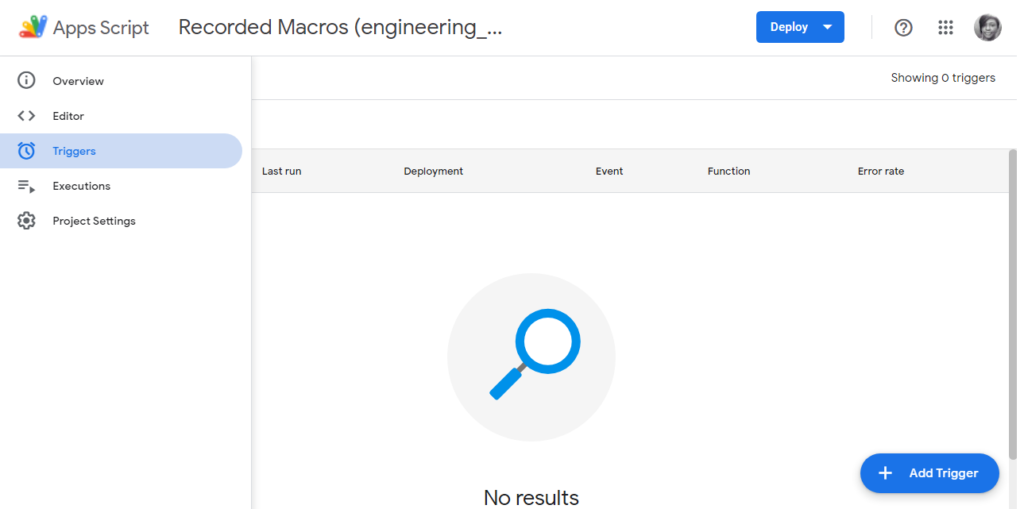
    Now that you’ve automated the script to run via the macro, then (b) you want to set up triggers so that this function can run by itself and send you notifications of new highlights.

    Adding Triggers - Apps Script for Marketers
    You go to the Triggers menu on Apps Script and click “Add Script”.
    Triggers - Apps Script for Marketers
    You then specify what the trigger will look like and how you want to receive notifications when the script runs.

    I hope this serves as a good basic foundation for understanding Apps Script. What else would you like to automate?

    **Resources:
    Zapier
    CMS Wire
    Udemy

  • How to inculcate UX (User Experience) into your marketing process

    How to inculcate UX (User Experience) into your marketing process

    Imagine you are looking for something to buy on the Internet. Say you want to buy something specific like Peppermint Tea because the normal tea bags containing caffeine are worsening your leaky gut (health) condition and someone had told you that Peppermint tea is perfect for leaky gut. So, you decide to do some research and then buy Peppermint tea. And off you go walking around mentally and looking at different posts/discussions on Peppermint tea. 

    You find one title that catches your attention and you decide to dive in, you dive in and then all of a sudden while digesting the information (and pseudo-making a decision to buy from that website) the button shows you more information and takes you to the purchase page which refuses to work. 

    Perhaps that’s not what happens, you decide to buy and you find navigating to the purchase page very tedious, plus the information on the purchase page is quite confusing.

    It doesn’t matter how you got there (which is the role of Marketing) in the first place if navigating/information architecture is tedious, you’ll most likely abandon the purchase and drop off. 

    We tend to think of user experience only in the context of product development and management. But it goes way beyond that, user experience flows all through your optimization attempts and calls for the product. Considering that Marketing is about bringing users in and getting them to perform certain actions that affect your bottom line, a good UX design should accomplish the business goals of your website by optimizing the lead conversion process.

    If you are in charge or involved in Marketing for your website/product, you need to ensure that asides from creating awesome content and a beautiful optimization path, your primary goal of converting visitors into leads and leads into buyers is well mapped out and fulfilled. Your conversion path should not scare people away, it should be intuitive and embracing. And the way to make sure that is done is to incorporate empathy into your design in achieving a conversion process that turns leads into buyers.

    After breaking down the different steps of a customer lifecycle that you want to optimize, which include (according to Segment’s top-notch analysis):

    Acquisition: Drive users to your site through various channels and get them to sign up.

    Activation: Engage users early on by having them participate with your most important feature(s).

    Retention: Get users to come back, visit and use your product multiple times.

    Referral: Leverage users who are jazzed about your product to refer others.

    Revenue: Convert users to pay you money for your services.

    You should then look at how great User Experience will help you achieve your set goals at each step of the Customer lifecycle or your own goals.

    At the Acquisition stage, make sure that Landing Pages are well designed, with the information well structured. Test colours, buttons, copy and general messaging – your calls to action must be clear and unambiguous.

    At the Activation stage, your funnel needs to be designed and defined in a way that makes it easy for your users to go from one point to the other. Be clear and succinct in what they stand to benefit, and how to use your product. Optimizing user behaviour and campaigns come in here, let your marketing automation flow and be seamless in communication/experience.

    And at the Retention stage, delight your users so that they can keep coming back. To get them to keep coming back, you have to make sure that their first couple of experiences met their needs without any hassle (user interviews can help you figure this out), and feedback on their previous experience should feed into how you design your product and funnel – which in turn helps your marketing become better.

    For referral, you need to design an easy referral machine into your user flow, so that it is easy for them to refer new people without it being a burden.

    At the revenue stage, make payment very easy for people – don’t use ambiguous, clumsy messaging and design elements. Design for trust, security, and ease.


    This piece was first published on Acumen Digital’s blog.